
Agent Skills in the Cloud: Inside ConsoleX AI Studio
Agent Skills has gotten a lot of attention recently, but most real-world implementations are still client-side (Claude Code / Cursor / Codex, etc.). Outside of Claude’s own assistant, it’s still uncommon to see a cloud SaaS product support Skills end-to-end.
Over the past year, ConsoleX AI Studio has evolved into a leading AI studio that supports most major LLMs and integrates with a vast tool ecosystem. It also features an “Autonomy mode” that enables LLMs to invoke tools for agentic workflows. It worked, but long‑horizon tasks kept failing in familiar ways:
- Attention drift: the longer the conversation, the more the initial constraints fade
- Token bloat + latency spikes: stuffing docs into context is expensive and often hurts reasoning
- Inconsistent tool usage: even with MCP-style tool calling, models still improvise
There was a user-side problem too: users often don’t know which tools to attach to a chat or what rules to give the model, which raises the learning curve and makes results harder to reproduce.
Why Skills ended up being the missing piece
Skills are a way to package operational know-how into something the model can load on demand:
- a clear “how to do the job” playbook (SOP),
- progressive disclosure (load only what’s needed),
- and “tool intuition” (when to use which tool, with what params, in what order).
In practice, this feels like giving the model procedural memory, instead of forcing it to re-derive workflows from scratch every time.
A few weeks ago, I integrated Skills into ConsoleX AI Studio — and it’s been better than I expected.
How we implemented Skills in a cloud SaaS
Skills naturally want to live as a directory structure. That’s trivial on a local machine, but a bit annoying in a SaaS environment. Here’s the architecture we landed on in ConsoleX.
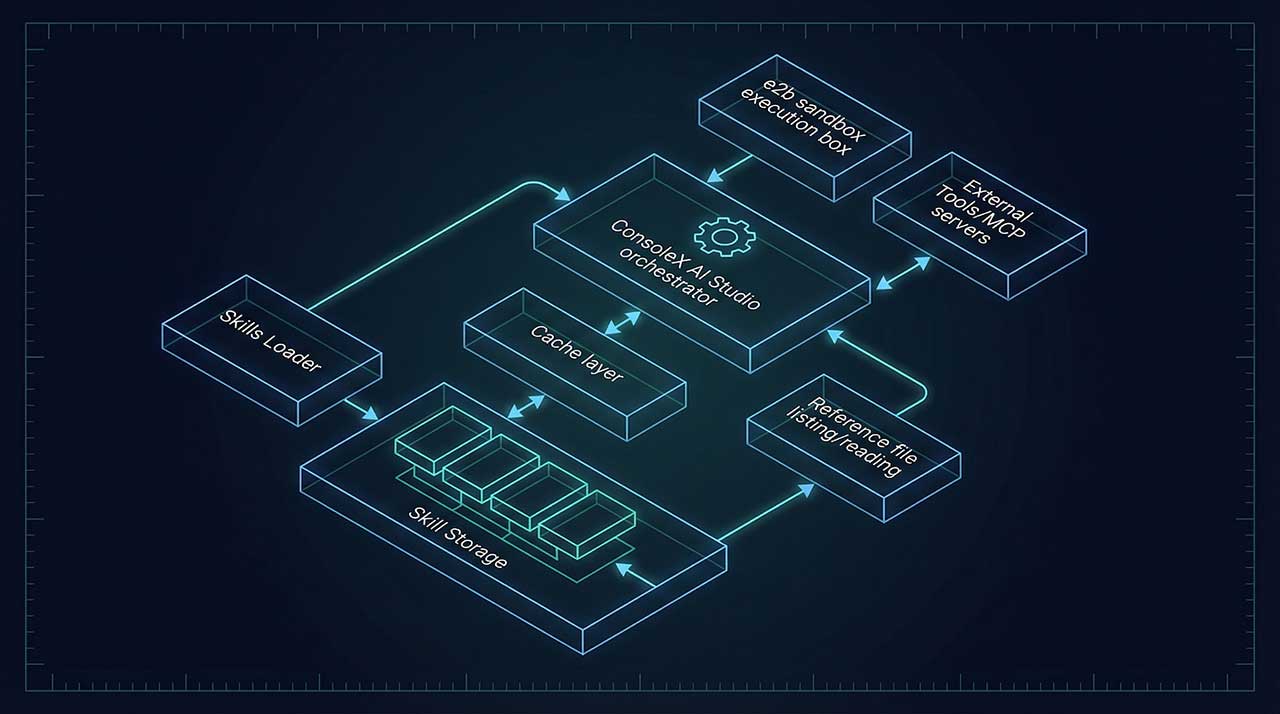
1) Skill storage: Azure Blob Storage
In the cloud, we needed a directory-like solution that’s fast, cheap, and easy to manage.
We chose Azure Blob Storage for skill packages, mainly because ConsoleX AI Studio already runs on Azure. Conceptually, it’s a “skill cabinet” the agent can pull from. For frequently used skills, we add caching (e.g., Redis) to avoid latency jitter from repeated fetches.
2) Progressive loading via tool calls
Following Skills best practices, we keep only meta info in the prompt. Then the agent loads what it needs via tool calls — like “flipping pages” instead of memorizing the whole book.
We implemented a small set of tools to make this work:
skills_load: loadSKILL.mdskills_list_files: list files inreference/skills_read_file: read specific chunks as needed
This keeps the context lean and helps the model stay grounded in the workflow.
3) Script execution in an isolated sandbox (e2b)
For safety and reliability, all scripts run in an e2b sandbox that can be spun up quickly. The agent can request file operations, run scripts, convert formats, save artifacts, etc. — but only inside that fenced environment. It’s been blazing fast and straightforward to implement.
4) Skills + tools + MCP: Skills as the conductor, not just scripts
In ConsoleX, Skills aren’t limited to local scripts. Since there’s already a tool ecosystem, Skills can also bind to — and invoke — external tools and MCP servers on demand.
This turns Skills into a workflow layer: not “a bunch of scripts,” but a repeatable orchestration pattern for tool-using agents.
What you can do now in ConsoleX AI Studio
Here are the main things users can do now with Skills:
- Toggle Skills per chat (on/off) and quickly pick prebuilt ones
- Use an open standard + add custom skills
You can create Skills and upload your own skill packages. - Mix-and-match Skills with any model and any tool stack
Skills aren’t tied to a specific model vendor. In a cloud agent setup, you can run the same Skill with OpenAI / Gemini / Claude / etc., and pair it with whatever third-party tools or MCP servers you want.
A real example: “document → slides” (one of our most-used Skills)
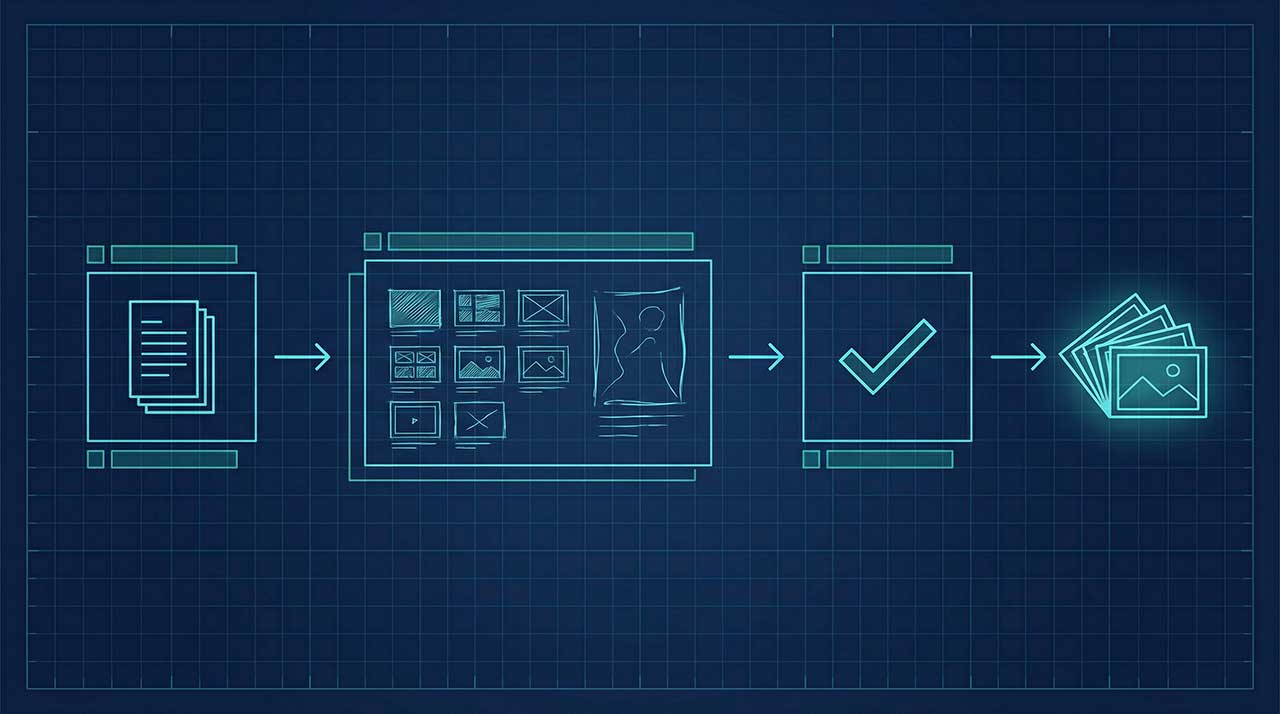
One of my favorite Skills converts documents into slides using a controllable workflow:
- The model generates a demo slide image + outline
- You confirm or adjust
- Then it batch-renders the final slides
The output is NotebookLM-style visual slides — but with more control, no watermark, and far fewer token/latency blow-ups halfway through.
What’s next
Agent workflows don’t fail because models can’t call tools. They fail because the process isn’t repeatable. Skills are how we turn “tool calling” into “operational execution” — and in a cloud product, that difference really matters.
If you’re building cloud agents or trying to make tool-using workflows less chaotic, feel free to reach out. We’re happy to share implementation details, design choices, and lessons learned.